Frequently asked questions about GrowTracker
Short answers to the questions parents and teens ask about GrowTracker: what the app does, how you use it day to day, what each plan includes and how the data is kept.
General
What is GrowTracker?
GrowTracker is a Hebrew and English app for tracking daily or weekly growth hormone injections for children and teens: reminders before each dose, pen-stock and prescription-renewal alerts, injection-site rotation, and care shared between parents.
It works as a web app on any phone or computer, and every feature is described on the features page.
Who is GrowTracker for?
GrowTracker is for parents of children who get growth hormone injections, and for teens who inject on their own. Parents can manage several children and add a second parent, and teens can mark their injections with their own login.
Does GrowTracker give medical advice?
No. GrowTracker is a tool for tracking and reminders: it is not a medical device and does not give medical advice. You set the dose, the injection time and the injection sites in it as you were instructed.
Which languages is GrowTracker available in?
GrowTracker is available in Hebrew and English, and you can switch the app's language at any time in Settings → Language.
Can I use GrowTracker with a weekly pen?
Yes. For each child you can choose a daily injection or a weekly injection on a fixed day.
For a weekly injection GrowTracker reminds you on the injection day, keeps the site rotation going from one injection day to the next and counts the stock in weeks. For a weekly injection the app never assumes it was given: if nobody marks it, it stays open for three more days and then shows as “not marked”, and you can correct it on the history page.
Plans and pricing
How much does GrowTracker cost?
GrowTracker is a paid app: there are two plans, Essential and Pro, billed monthly or yearly, and a new account gets a 30-day free trial on either one.
Charges are in US dollars, through Lemon Squeezy; if your card is in another currency, the amount charged depends on your credit card company's exchange rate. The current prices are on the pricing page.
Do I need a credit card to start the trial?
On Essential you don't need a credit card, and on Pro you do. The Essential trial starts without a card and nothing is charged when it ends: to continue, you choose a plan, and your data is kept in the meantime. On Pro, you give your card details when the trial starts, and the first charge is made when the 30 days end, unless you cancel before then by email to support@growtracker.app.
What's the difference between Essential and Pro?
On top of Essential, Pro adds height and weight tracking with WHO percentiles, unlimited children and a year of injection history.
Essential includes up to 2 children, 90 days of history and all the injection tracking: reminders, pen stock and a prescription-renewal alert, injection-site rotation, sharing with a second parent, the child's own login and the tracking report. The full comparison is on the pricing page.
How many children can I manage?
Up to 2 children on Essential, and no limit on Pro. A child another parent invited you to follow doesn't count toward your limit: that child is included in the plan of the parent who manages them.
How do I cancel my subscription?
You cancel it yourself in Settings → Subscription Management → Cancel Subscription, without a phone call and without giving a reason. The subscription stays active until the end of the period you paid for, no further charge is made, and until then you can renew it from the same screen.
During the Pro trial, you cancel by email to support@growtracker.app before the 30 days end, and then nothing is charged. You can also cancel by email at any other time. All the details, including your right to cancel under Israel's Consumer Protection Law, are in the Hebrew Terms of Use, section 7b.
Reminders and installation
How do the reminders work?
Each injection day has up to three reminders: one to take the pen out of the fridge, one at injection time, and one to the parents if the injection hasn't been marked yet.
You set the times in Settings → Time Settings, and the reminders arrive as notifications on phones and computers; once the injection is marked, that day's remaining reminders aren't sent. On Android and on a computer with Chrome or Edge, you can snooze a reminder for 10 minutes right from the notification (on iPhone the button isn't shown), and each person chooses which alerts reach them (in Settings → Parents & sharing → “My alerts”).
Do I need to keep the app open to get reminders?
No. The reminders are sent from the server as notifications and arrive even when the app is closed, as long as notifications are enabled on the device; on iPhone, once you've added the app to the Home Screen.
What do I need to get notifications on an iPhone?
You need to add GrowTracker to the Home Screen: on iPhone, notifications work only when the app is installed there.
In Safari, tap “Share”, choose “Add to Home Screen”, open GrowTracker from the Home Screen and turn on notifications from inside the app. There's no need to download an app from the App Store.
Does GrowTracker work on Android?
Yes, as a web app in the browser, such as Chrome, and notifications work even without installing it. If you like, you can add it to your phone's home screen and open it like any other app.
Does GrowTracker work without an internet connection?
Not fully: the reminders are sent from the server, and marking an injection is also saved on the server, so you need an internet connection. Without a connection, the app shows a message that there is no connection.
Everyday use
Can two parents track together?
Yes. In Settings → Parents & sharing you invite the other parent, who can also mark injections.
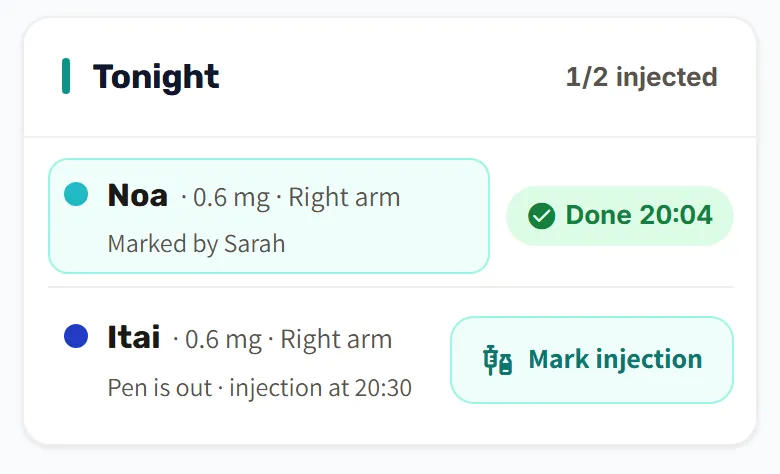
The invitation is a single-use code or link, valid for 7 days, and the other parent doesn't need an extra subscription. Both parents see in real time whether the injection was given and who marked it.
Can my child mark the injection on their own?
Yes. In Settings → Child Management → Edit, turn on “Allow child to log in independently” and create the child's own login, with an email and a password.
The child marks the injection from their own phone, and the parents see it in real time. The login is included in both plans, and anyone 16 or older who injects themselves can also open their own account, with a plan of their own, and invite their parents to follow along.
What happens if we forget to mark an injection?
You can mark it later, and if nobody marks it, the app assumes the injection was given and marks it as done automatically (except on a day you marked as not injecting, or when the pen no longer holds enough for the dose and no pens are left in stock: then the app tells you it couldn't mark the day automatically).
Each day's injection can be marked as usual until 03:00 the next morning; after that the day closes. When the app marks it automatically, the dose comes off the stock, and the next time you open the app, a message appears with the option “Undo (Not Done)”. On the history page you can also add an injection that was given on a past day and not marked, or correct an earlier day's record.
How does GrowTracker help with pen stock?
The app keeps track of what's left in the open pen and in stock, and warns you 7 days before the pens run out, so you have time to renew the prescription.
The dose of every injection you mark comes off the pen, and when the pen no longer holds enough for a dose, a new pen is opened from the stock. If you split a dose instead, injecting what is left in the pen and the rest from a new pen, choose that in Settings → Pens & Dosages: the app shows both injections and counts what was left in the pen too. The inventory card shows how long the stock will last and by when to renew the prescription, and if you set the day of the month your prescription is renewed (in Settings → Pens & Dosages), the app also warns you when the stock will run out before the regular renewal date.
Can I change the injection time for a few days, for example on vacation or on a flight?
Yes, with “Temporary schedule” in Settings → Time Settings: you choose a date range of up to 60 days, the injection time on those days and when to take the pen out of the fridge.
The reminders of everyone following the child's injections move to the new times, and after the last day they return to the regular times by themselves, without you having to change anything.
How does injection-site rotation work?
The app shows today's injection site and the next one in line, and the site changes automatically every day, in order. With a weekly injection the site changes from one injection day to the next, even in a week without an injection.
You set the list of sites and their order in Settings → Injection Sites, as you were instructed; you can also add sites with names of your own.
Is there a printable tracking report?
Yes, a tracking report, ready to print, to save as a PDF or to share.
It sums up on which days the injection was given and on which it wasn't, with the reason recorded, and includes the injection log and the injection sites, and on Pro also the growth measurements with percentiles. The report is included in both plans and covers up to 90 days back on Essential and up to a year on Pro.
Privacy and security
Where is the data stored, and how is it protected?
The data is stored on Render cloud servers in the United States, connections are encrypted, and sensitive fields are also stored encrypted in the database, such as the name in the child's profile, the medication name, the dose, injection-site names, notes, and height and weight values.
There are no ads, tracking cookies or third-party analytics tools in the app, and the data isn't sold or passed on to advertisers. A plain-language explanation is on the security and privacy page, and the full details are in the Privacy Policy.
Can I export or delete my data?
Yes, at any time, in Settings → Account & Security: “Export My Data” downloads your data and the data of the children you manage as a JSON file, and “Delete Account” deletes the account and the data of the children you manage. A login a parent created for a child can't be deleted from within it: the parent turns it off or deletes the child's profile.
The profiles of the children you manage are permanently deleted, with their injection history, growth measurements and inventory data, and the account record remains without an email address or name. These profiles are also deleted for the second parent and for everyone the children are shared with.
Before you delete the account, cancel a paid subscription in Settings → Subscription Management (during the Pro trial: by email to support@growtracker.app). You can also delete just one child's profile, in Settings → Child Management; all the details, including for anyone who can't sign in to their account, are in the Privacy Policy.
Didn't find an answer here? Write to us at support@growtracker.app.
Want to try GrowTracker?
30-day free trial. Essential needs no credit card.