
Sharing between parents: everyone sees whether the injection was done
In GrowTracker, both parents follow the same child's injections together, each with their own account, and the child can have their own login too. Everyone sees in real time whether the growth hormone injection was done and who marked it.
Invite with a code, no extra subscription
The invitation is sent by the parent who added the child to the app: Settings → Parents & sharing → “Invite another parent”. You can add an email address, and you get an invitation code of 8 letters and digits, with a ready-made message and a link to send. The code is valid for 7 days and can be used once, and invitations that haven't been used yet can be canceled from the same page.
The other parent opens the link, signs in to their account or creates a new one, and is added to the child automatically, without setting the child up again. The code can also be typed on the first screen after creating the account, under “Got a code from the other parent? Join an existing child”. When someone joins, the parent who invited them gets a notification.
The other parent doesn't need a subscription of their own: the child is covered by the plan of the parent who manages the child, and sharing is included in both plans. The other parent marks injections, opens pens and sees everything.
You can also invite someone to view only: they see only what you chose to share, and can't mark or change anything.
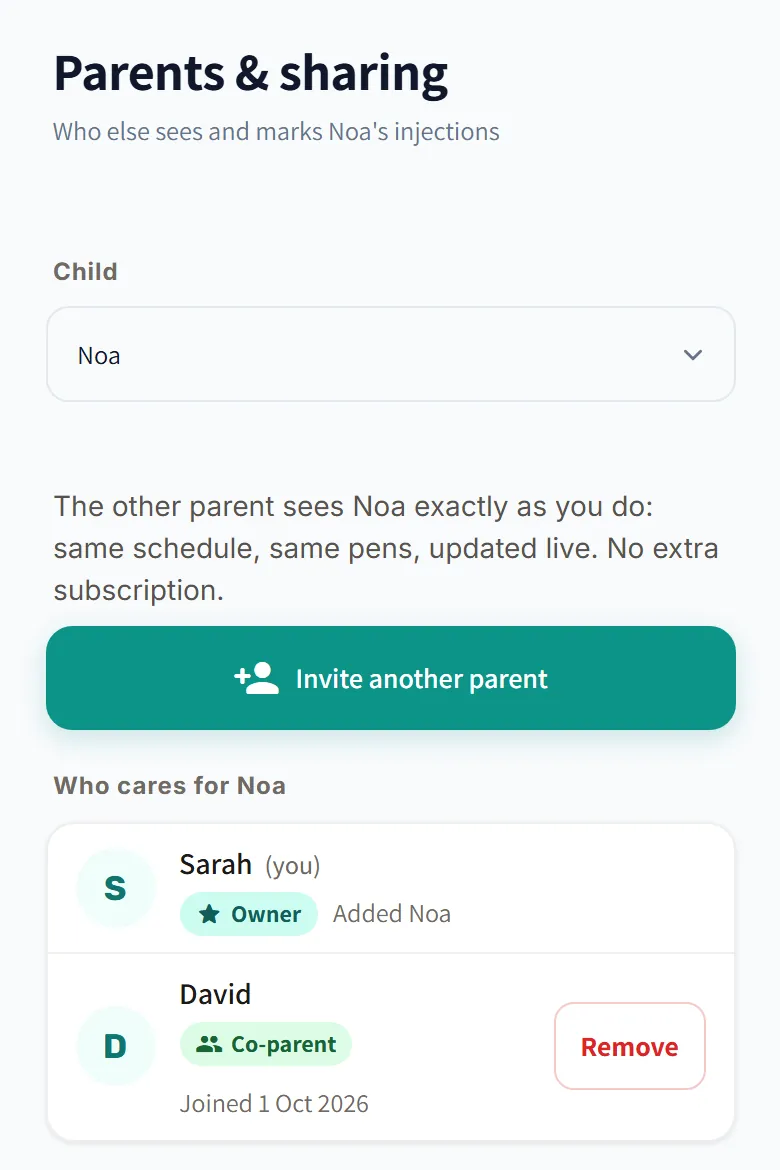
Only the parent who added the child, who appears in the list as “Owner”, can invite and remove people. A removal takes effect at once, and anyone who was invited can also leave on their own.
Everyone sees who marked it, in real time
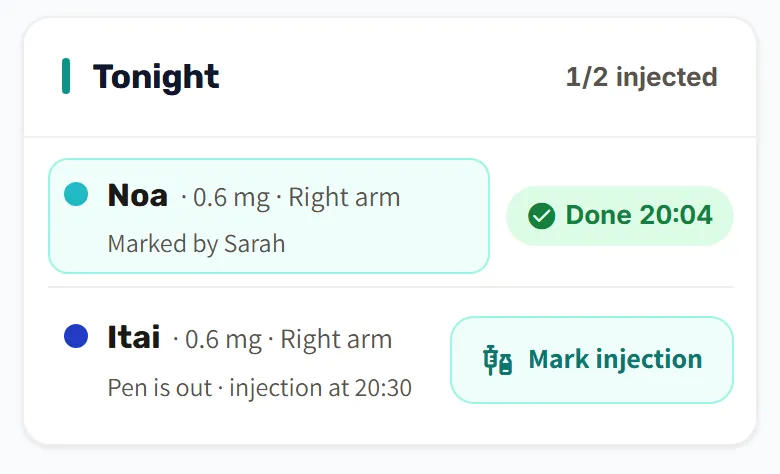
When someone marks that the pen was taken out of the fridge or that the injection was done, everyone else's home screen updates at once, if it is open, with a short message such as “David marked: injection done”. Today's card shows “marked by” with the name, and the injection log keeps who marked each day. So there's no need to send a “Did you inject?” message and wait for an answer.
In a family with several children, the “Tonight” card on the home screen shows for each child whether the injection was done, who marked it and what is still waiting.
Reminders: everyone chooses their own
Each parent gets the daily reminders on their own phone and computer, and chooses for themselves which ones reach them, in Settings → Parents & sharing → “My alerts”.
A separate login for the child, and an account for those who inject themselves
In Settings → Child Management → Edit, you turn on “Allow child to log in independently” and create a login for the child with an email and password. The teen marks the injection from their own phone, and the parents see it in real time. The login is included in both plans, and the managing parent can turn it off at any time: the devices signed in with it stop getting notifications at once and are signed out within 15 minutes at most, and the child's data stays.
Someone who injects themselves and has opened their own account (age 16 and up) can invite their parents, so they see that the injection was marked without asking. More about both ways on the page for teens who inject on their own.
Who it helps
- For parents: whoever the child is with tonight marks it, and the other parent sees it, even when the child moves between two homes.
- For teens who inject on their own: independence, and the parents see that the injection was marked.
The tracking report also shows who marked each day. More about GrowTracker on the features page, and short answers in the FAQ.
Questions about sharing between parents
Does the other parent need their own subscription?
The other parent doesn't need their own subscription: the child is covered by the plan of the parent who manages the child, and sharing is included in both plans. If the managing parent's subscription isn't active, no one can open the child in the app until the subscription is renewed, and all the data is kept.
Do both parents get reminders?
Yes. Each parent gets the reminders on their own phone and computer, and chooses for themselves which ones reach them. Once one of them marks the injection, that day's remaining reminders aren't sent.
The code expired or was already used. What now?
Ask the managing parent for a new invitation code, which they create in Settings → Parents & sharing. Each code is valid for 7 days and can be used once, and a code that hasn't been used yet can also be canceled.
How do I remove someone's access?
The managing parent taps “Remove” next to the name, in Settings → Parents & sharing, and the access is removed at once. To come back, a new invitation code is needed.
Want to try GrowTracker?
30-day free trial. Essential needs no credit card.