
Growth hormone injection reminders
Every day, GrowTracker reminds you to take the growth hormone pen out of the fridge, reminds you when it's time for the injection, and sends one more reminder if the injection hasn't been marked yet.
Three reminders a day, at the times you set
You set it up once, in Settings → Time Settings: the daily injection time, how many minutes before it to take the pen out of the fridge, and whether to send one more reminder if the injection hasn't been marked, and after how many minutes. From then on the reminders come on their own, every day:
- Take the pen out of the fridge: before the injection, as many minutes ahead as you set.
- Injection time: at the time you set.
- Injection not marked yet: one more reminder after the injection time, if nobody has marked it yet.
If you inject yourself and don't need a separate pen-out step, you can choose “One button: ‘I injected’” in Time Settings. Then one tap marks the evening, and the pen-out reminder isn't sent.
Once the injection is marked, the reminders stop
You mark the injection on the home screen by tapping “Mark Injection Done”. Once it's marked, the reminders left for that day aren't sent. When you mark that the pen is out of the fridge, the pen-out reminder isn't sent anymore.
On a day you don't inject, you mark “Not injecting today”, with a reason if you want. The day is recorded as “Not injected” (and in the history calendar: “Skipped”), no dose comes off the stock, and its reminders won't be sent.
A pen-out or injection reminder that's delayed, for example because the phone was off, arrives up to 6 hours after its time and no later, so you don't get a reminder for a moment that has already passed.
On your phone and computer, and on iPhone too
The reminders arrive as notifications on every phone and computer where you turned notifications on and, if the app is open, on the screen itself too. On Android and on a computer it works from the browser, with nothing to install. On iPhone you first need to add GrowTracker to the Home Screen.
Snooze 10 minutes from the notification, on Android and on a computer
On Android, and on a computer with Chrome or Edge, the notification itself has a “Snooze 10 min” button. Tapping it brings the reminder back in 10 minutes, without opening the app. If the injection is marked in the meantime, the snoozed reminder won't come. On iPhone the notification has no such button.
Everyone chooses which reminders reach them
When several people follow the same child, each of them chooses for themselves which reminders about the child reach them: taking the pen out, injection time, “Injection not marked yet” and the pen stock alerts. The choice is in Settings → Parents & sharing → “My alerts”, and it applies only to the person who made it.
The “What reaches whom” table shows who gets what. If “Injection time” is off for everyone, the app points out that nobody will get an injection reminder.
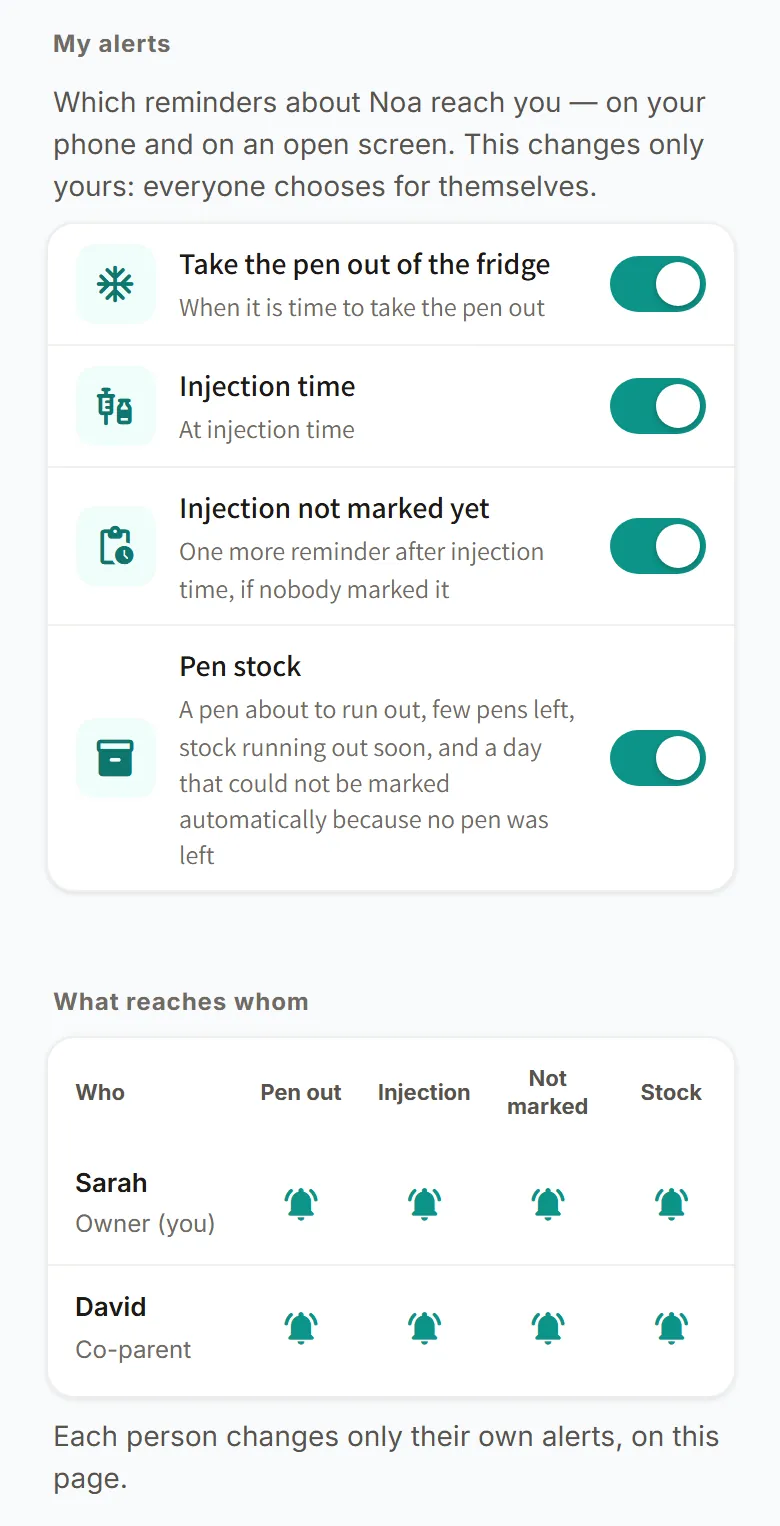
You invite the other parent in Settings → Parents & sharing, and the page on sharing between parents has all the details.
For parents and teens
- For parents: both parents get the reminders on their own phones, and each of them sees in real time whether the injection has been marked and who marked it.
- For teens who inject on their own: with their own login, the teen gets the reminders on their own phone and marks the injection themselves, and the parents can keep just the “Injection not marked yet” reminder for themselves.
Teens who inject themselves have a page of their own: teens who inject on their own.
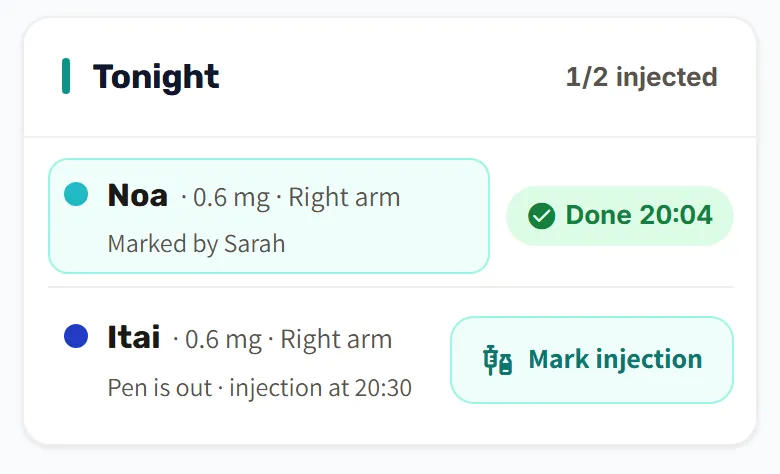
Every mark is saved in the injection log, and each day's site appears on the injection card according to the injection-site rotation. For different times over a few days, on vacation or for a flight for example, there's a “Temporary schedule”: the reminders move to the new times and go back to the usual ones on their own.
More about GrowTracker on the features page, and short answers in the FAQ.
Questions about the reminders
What do I need to get reminders on an iPhone?
On an iPhone, you get reminders only after you add GrowTracker to the Home Screen. In Safari, tap “Share”, choose “Add to Home Screen”, open GrowTracker from the Home Screen and turn on notifications from inside the app. There's no need to download an app from the App Store.
Can both parents get the reminders?
Yes, both parents get the reminders: each parent logs in with their own account, gets them on every phone and computer where they turned notifications on, and chooses for themselves which ones reach them. An invited parent needs no extra subscription.
What happens when I snooze a reminder?
A reminder you snooze with the notification's “Snooze 10 min” button (on Android, and on a computer with Chrome or Edge) comes back after 10 minutes. If the injection is marked in the meantime, it won't come.
Can I change the reminder times for a few days?
Yes, with a “Temporary schedule” in Settings → Time Settings: a date range of up to 60 days, with its own injection time and pen-out time. After the last day, the reminders go back to the usual times on their own.
Want to try GrowTracker?
30-day free trial. Essential needs no credit card.