
Growth hormone pen stock and prescription renewal alert
GrowTracker keeps track of what's left in the open pen and in the full pens, works out how long the stock will last, and alerts you 7 days before it runs out, so you can renew the prescription in time.
What you enter once
In Settings → Pens & Dosages you enter the dose for one injection, in the unit on the prescription, how much medication a full pen holds, how much is left in the open pen right now and how many full pens you have in stock. You also set a threshold for the low-stock alert and, if you like, the day of the month on which you renew the prescription.
Every injection takes a dose off the pen
When you mark an injection, the dose comes off the open pen. When the pen no longer holds enough for a full dose, the app opens a new pen from the stock and takes the dose from it, and whatever was left in the previous pen no longer counts. If you split a dose instead, injecting what is left in the pen and the rest from a new pen, choose that in Settings → Pens & Dosages: the app shows both injections and counts what was left in the pen too. You can also open a new pen yourself, by tapping “Open New Pen” on the inventory card.
Undoing an injection mark puts the dose back, and a day marked “Not injecting today” takes no dose at all. If the amount in the pen doesn't match what the app has recorded, “Correct the amount in the pen” updates it.
How long the stock will last
The inventory card on the home screen shows how much is left in the open pen and roughly how many doses that is, how many full pens there are, and how many days all the stock will last. Below that is the date the stock runs out and, next to it, the date to renew the prescription by: a week before that date, or your regular renewal day if you entered one and the stock lasts until then.
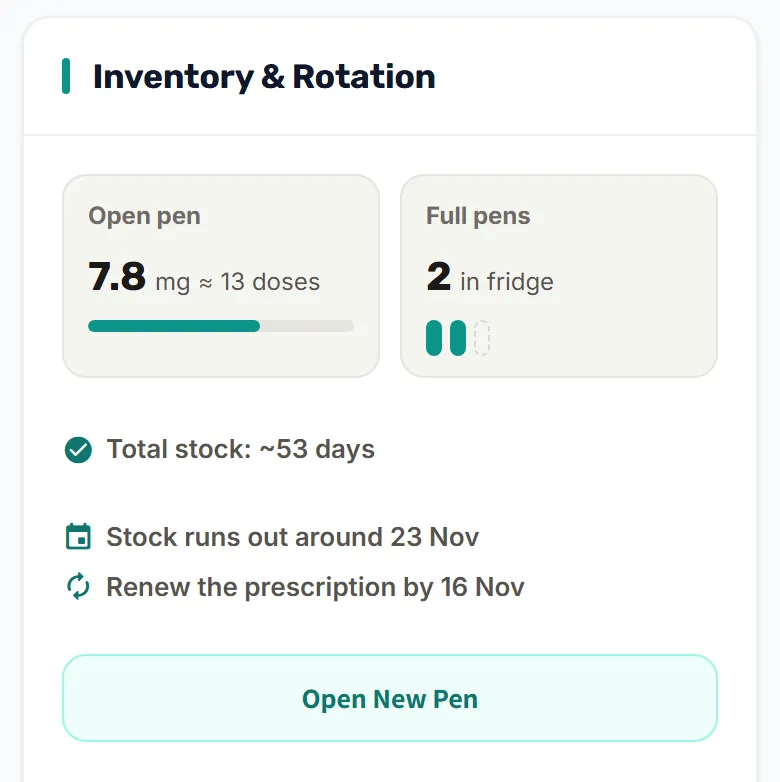
The calculation counts only whole doses, in each pen separately, the way the app actually takes them off, and assumes one dose a day. A day marked “Not injecting today” pushes the end of the stock back by one day. With a weekly injection it assumes one dose a week, shows the stock in weeks, and a skipped week pushes the end of the stock back by a week.
If you entered the day of the month on which you renew the prescription, the card mentions that day, and warns you when the stock will run out before your usual renewal date.
Alerts before the stock runs out
- Pens running out soon: when the stock covers 7 days or less, an alert is sent with the date it runs out, so you can renew the prescription in time. It's sent once, and if you add pens, it comes back only when the new stock nears its end.
- Not enough in the pen for the next injection: when less than one dose is left in the open pen.
- Few pens left: when the number of full pens reaches the threshold you set or drops below it.
The parents and the child's own login get these alerts, and each person can turn them off for themselves in Settings → Parents & sharing → “My alerts”.
GrowTracker doesn't renew prescriptions or order pens itself: it shows when to do it, and you handle the renewal as usual.
Who it helps
- For parents: when two parents mark injections, every mark takes a dose off the same stock, and both see the same card. There's no need to count pens to know when to renew the prescription.
- For teens who inject on their own: a reminder to renew the prescription in time, without working it out themselves.
For the injections themselves there are the daily reminders, and every marked injection is saved in the injection log. More about GrowTracker on the features page, and short answers in the FAQ.
Questions about pen stock
How does GrowTracker show when to renew the prescription?
The inventory card shows “Renew the prescription by…”: a week before the last day the stock covers, or “Renew the prescription today” once that date has come. If you entered a renewal day of the month, the card mentions it, and warns you when the stock will run out before your usual renewal date.
What happens when the open pen runs out?
When the pen doesn't hold enough for a full dose, the app opens a new pen from the stock and takes the dose from it, and whatever was left in the previous pen no longer counts. If you split a dose instead, injecting what is left in the pen and the rest from a new pen, choose that in Settings → Pens & Dosages: the app shows both injections and counts what was left in the pen too.
New pens arrived. How do I update the stock?
In Settings → Pens & Dosages, update the number of full pens in stock, and the dates on the inventory card update to match.
Who gets the alert that the stock is about to run out?
The parents and the child's own login get it, and each person can turn it off for themselves.
Want to try GrowTracker?
30-day free trial. Essential needs no credit card.