
Security and privacy
GrowTracker stores the data on Render cloud servers in the US, encrypts the communication and sensitive fields in the database, and doesn't use the data for advertising or sell it. This page explains in plain words how the data is protected, who sees it and what you can do with it yourself. The full text is in the Privacy Policy.
Where the data is stored
The data is stored on Render cloud servers in the United States, where the database and the app's servers are. When you sign up, you consent to the transfer of the data to the United States and its storage there.
Some actions also go through other services outside Israel: signing in with Google, sending emails (for example, to reset a password) and delivering notifications to the phone. More details are in section 4a of the Privacy Policy.
Encrypted communication
All communication between your phone or computer and GrowTracker is encrypted (HTTPS). A request over an unencrypted connection is redirected to the encrypted one, and the browser is asked to connect to the site only over an encrypted connection from then on (HSTS).
Sensitive fields are encrypted in the database too
Beyond encrypting the communication, sensitive fields are also stored encrypted in the database (field-level encryption), such as the name in the child's profile, the medication name, the dose, the names of the injection sites, notes, and the height and weight values.
Passwords and signing in
- Passwords. Your password isn't stored in plain text: only a one-way hash of it (BCrypt) is stored, from which it can't be read.
- Staying signed in on a device. After you sign in, the device's access is valid for 15 minutes and renews itself, and a device that hasn't been used for 30 days has to sign in again.
- Logging out of all other devices. In Settings → Account & Security, the “Log out of all other devices” button signs out every other device signed in to the account: they are signed out within 15 minutes at most, and notifications to them stop. If the app's home screen is open on one of them, it switches to the sign-in screen right away. The device you tapped it on stays signed in.
- A child's login. When the owner changes the email or password of the login they created for the child, or turns it off, that login is signed out the same way on every device signed in with it.
Notifications on your phone and computer
Reminders reach a phone or computer only after you turn on notifications there, and you can turn them off at any time in the app's or the browser's settings.
On the way to the device, the notifications the server sends pass through the browser's or the operating system's push service. Their content is encrypted end to end, so the service that delivers them can't read it, and they show only the first letter of the child's name.
Payment
You enter your credit card details on Lemon Squeezy's payment page, and they are not stored on GrowTracker's servers. The invoice is issued by Lemon Squeezy, which is the party to the payment transaction.
No advertising and no tracking cookies
Your data is not used for advertising, not sold and not passed to advertisers, and the app has no third-party tracking cookies or external analytics tools.
Your browser stores your sign-in details and your settings, such as the language and the display mode. A banner at the bottom of the screen explains this and asks for your consent, and preferences that aren't essential are stored only after you consent.
Who sees the child's data
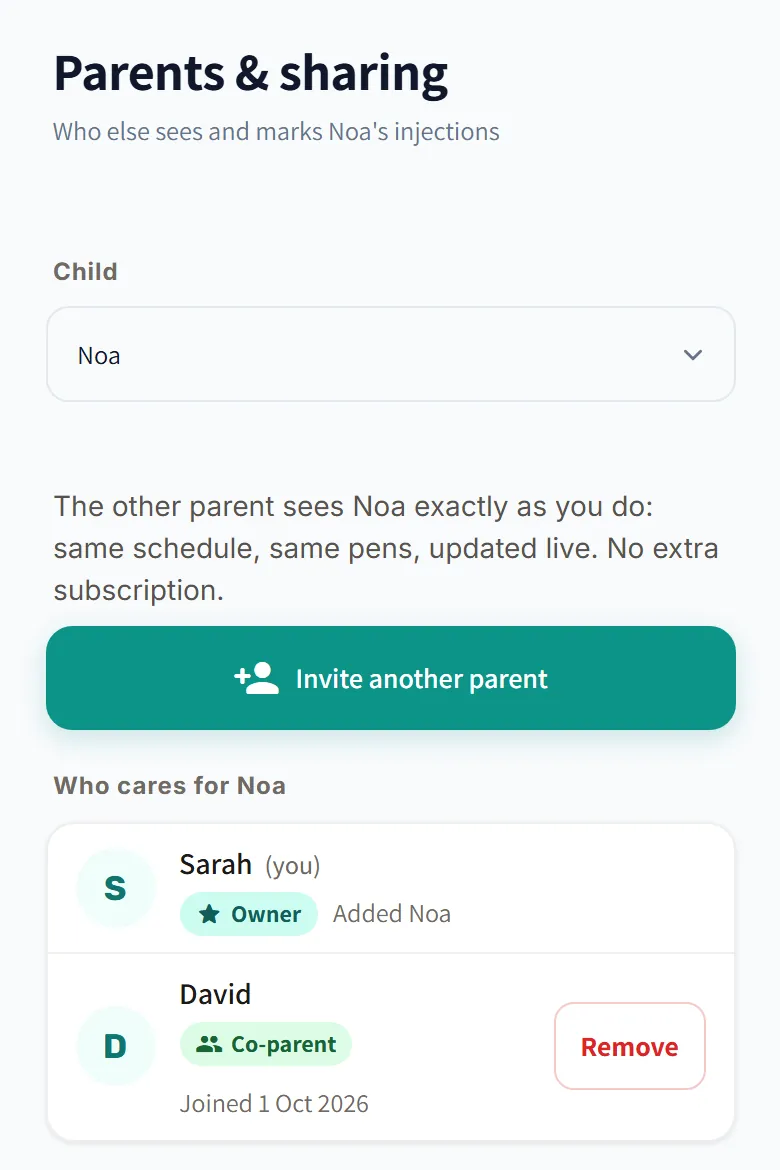
Other users see a child only if the person who added the child to the app invited them, with a single-use invitation code valid for 7 days, or created the child's own login.
The owner can remove any participant at any time, and that person's access is removed right away. There's more about invitations on the page about sharing between parents.
Your rights: export, correction and deletion
You can do most of this yourself, in Settings → Account & Security; for any other privacy request, write to privacy@growtracker.app. The full details, including your rights under Israel's Protection of Privacy Law, are in the Privacy Policy.
- Export. “Export My Data” downloads a JSON file with your data and the data of the children you manage, after you confirm with your password or your Google account.
- Correction. You correct your account details, the child's details, the times and the dose yourself in Settings, and send any other correction request by email.
- Deletion. “Delete Account” permanently deletes the profiles of the children you manage, and with them their injection history, growth measurements and inventory data, and the account record remains without your email and name. These profiles are also deleted for everyone the children are shared with. You can also delete just one child's profile, in Settings → Child Management.
- A paid subscription. Cancel it before you delete the account, because deleting doesn't cancel it. You cancel it in Settings → Subscription Management; during the Pro trial, write to support@growtracker.app.
- Withdrawing consent. “Withdraw Consent” withdraws your consent to the processing of the medical data, and the account is closed after 30 days. Withdrawing consent doesn't delete the data: to delete it, delete the account.
If you can't sign in to your account, send a deletion request from the account's email address to privacy@growtracker.app. More details on deleting an account are in section 8a of the Privacy Policy. A login a parent created for a child can't be deleted from within it, and consent can't be withdrawn from it: the parent turns it off or deletes the child's profile.
Questions about security and privacy
Where is GrowTracker's data stored?
GrowTracker stores the data on Render cloud servers in the United States. The communication is encrypted, and sensitive fields, such as the name in the child's profile, the medication name and the dose, are also stored encrypted in the database.
Who can see my child's data?
GrowTracker shows a child to other users only if the person who added the child to the app invited them with an invitation code, or created the child's own login, and anyone invited can be removed at any time.
How do I sign out a lost phone?
You sign out a lost phone from another device: sign in to the account there and, in Settings → Account & Security, tap “Log out of all other devices”. The lost phone is signed out within 15 minutes at most, and notifications to it stop.
Does GrowTracker store my credit card details?
No. You enter the card details on Lemon Squeezy's payment page, and they are not stored on GrowTracker's servers.
What is deleted when I delete my account?
When you delete your GrowTracker account, the profiles of the children you manage are permanently deleted, with their injection history, growth measurements and inventory data. The account record remains without your email and name, and you cancel a paid subscription before deleting, because deleting doesn't cancel it.
Want to try GrowTracker?
30-day free trial. Essential needs no credit card.