
Injection-site rotation in growth hormone treatment
Every day, GrowTracker shows which site to inject in and which site is next, and changes the site automatically in the list and order you set, as you were instructed.
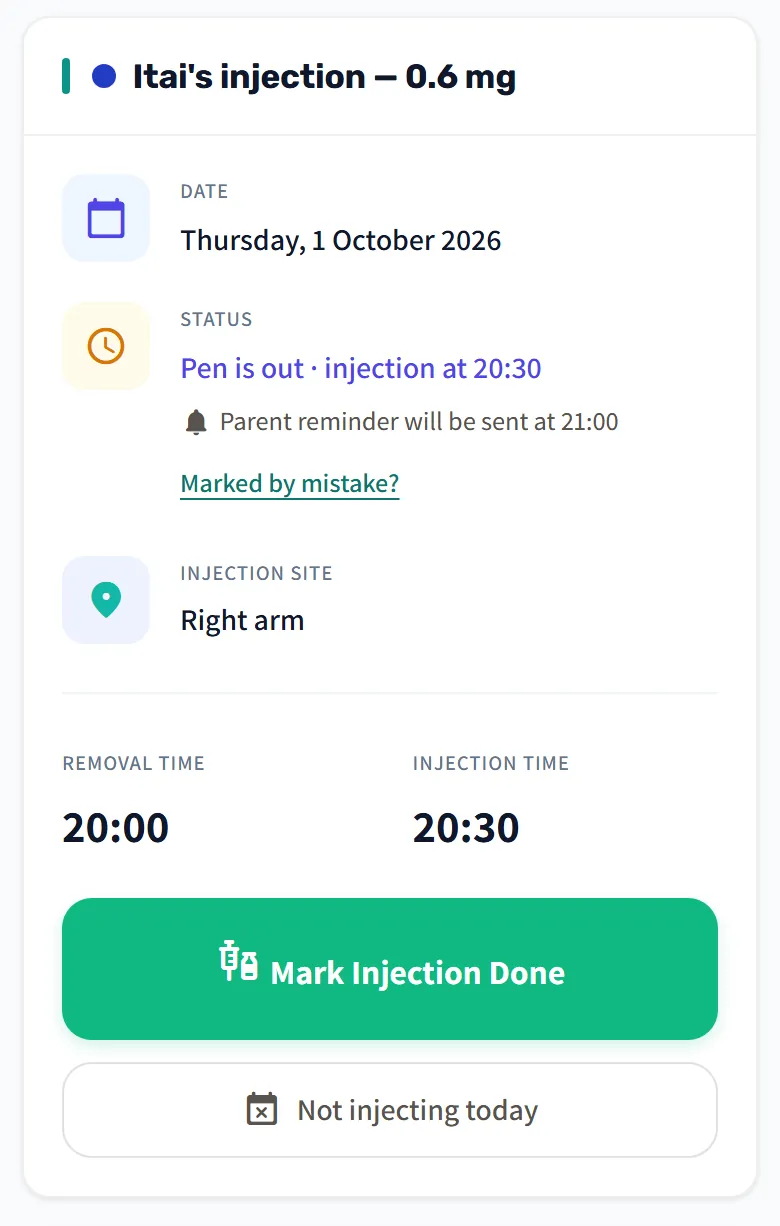
Today's site, on the home screen
Today's injection card shows the injection site, next to the pen-out time and the injection time. The recent-days card also shows tomorrow's site, so you know ahead of time what's coming.
How the site changes
The “Injection Site Rotation” circle shows all the sites around it, numbered in order. Its center says when the next injection is and at which site, and the labels “Tonight” or “Next”, “After that” and “Given” sit on the sites themselves. The site changes every day, by the date, in the order you set, and after the last site on the list the rotation goes back to the first.
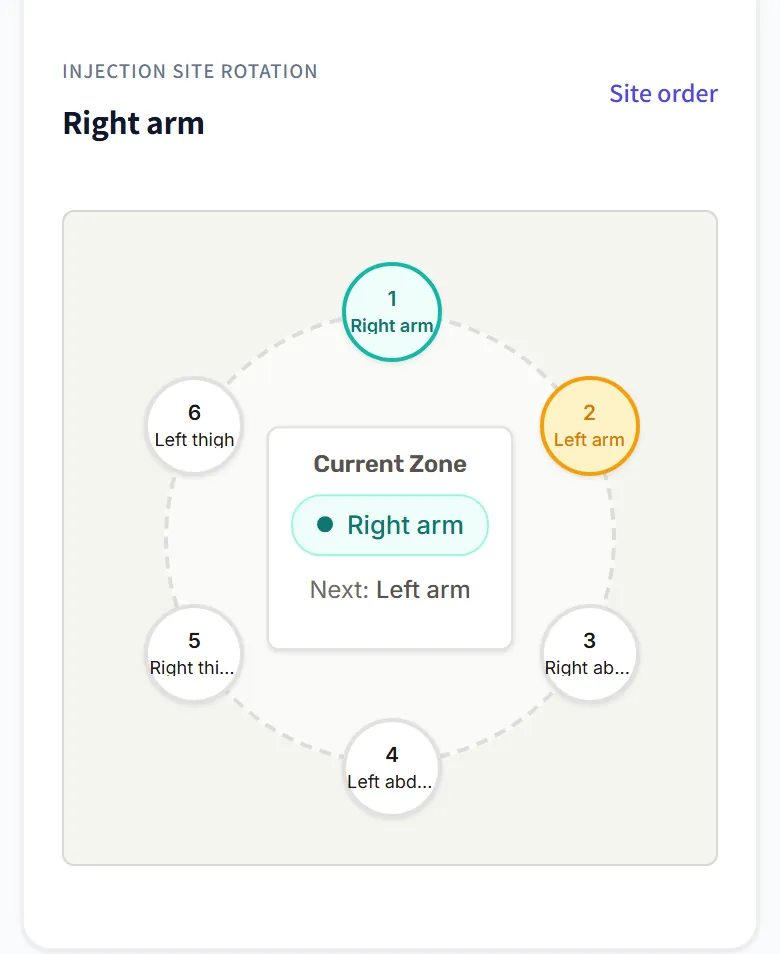
The site is set per child, so everyone following the child sees the same site for today, and so does the child on their own phone. Because the rotation follows the date and not the injections, it moves on even on a day without an injection, and the next day brings the next site on the list. With a weekly injection the site changes from one injection day to the next, even in a week without an injection.
When you sign up, you can say where you injected yesterday, and the rotation continues from the next site.
You set the list and the order
In Settings → Injection Sites you choose which sites go into the rotation and in what order, as you were instructed. There are eight ready-made sites: arm, thigh, abdomen and buttock, each on the right and on the left. You can also add sites with names of your own.
- Drag a site by its handle, or use the arrows, to move it in the order.
- Add a site at the bottom of the list.
- Remove a site by tapping ×.
The next injection's site is highlighted in the list. Adding a site or changing the order doesn't move it; to continue the rotation from a different site, choose it under “Continue the rotation from”. A ready-made site is shown in the app's language, Hebrew or English, and a site you added is kept under the name you typed.
The sites are saved in the log and the report
Every injection is saved with its site. In the injection log you see, for each day, which site was used, and the tracking report has a summary of the number of injections at each site over the report period.
Who it helps
- For parents: when two parents take turns injecting, both see the same site, and nobody has to remember which side was injected yesterday.
- For teens who inject on their own: today's site appears on their own phone too, with their own login.
On the home screen, today's site appears next to the injection times and the pen stock, and the daily reminders arrive at those times. More about GrowTracker on the features page, and short answers in the FAQ.
Questions about injection-site rotation
Which injection sites can I set up?
GrowTracker includes eight ready-made sites: right and left arm, right and left thigh, right and left abdomen, and right and left buttock, and you can also add sites with names of your own. You choose which of them to use, and in what order, as you were instructed.
Does GrowTracker recommend which site to inject in?
No, GrowTracker doesn't recommend an injection site. It follows the list and the order you set and shows which site is next. Which sites to inject in, and how, follows the instructions you were given.
What happens to the rotation on a day without an injection?
The rotation follows the date, so it moves on even on a day like that, and the next day brings the next site on the list. To continue the rotation from a different site, choose it under “Continue the rotation from” in Settings → Injection Sites.
Can I change the list at any point?
Yes, at any time: add a site, remove one or change the order. The next injection's site doesn't change, unless you removed it or chose another under “Continue the rotation from”, and the rotation continues in the new order.
Want to try GrowTracker?
30-day free trial. Essential needs no credit card.