
Height and weight tracking with World Health Organization (WHO) percentiles
In GrowTracker you record the height and weight from every measurement and see them on the World Health Organization (WHO) percentile curves, with the percentiles of each measurement, from birth to age 19. Growth tracking is available on the Pro plan.
You record a measurement, the app does the math
On the “Growth Tracking” page, tap “Add Measurement” and enter the measurement date, the height in cm, the weight in kg or both, and the source of the measurement: “Home measurement”, “Doctor” or “Clinic”. You can add notes. When a measurement has both height and weight, the app calculates BMI.
Each measurement gets a percentile for the age on the measurement date, in completed months, so you can also enter past measurements. A measurement with a future date isn't saved. Calculating the percentiles requires the sex and date of birth to be set, and if you correct either of them, the percentiles of all the measurements are recalculated.
The WHO percentile curves
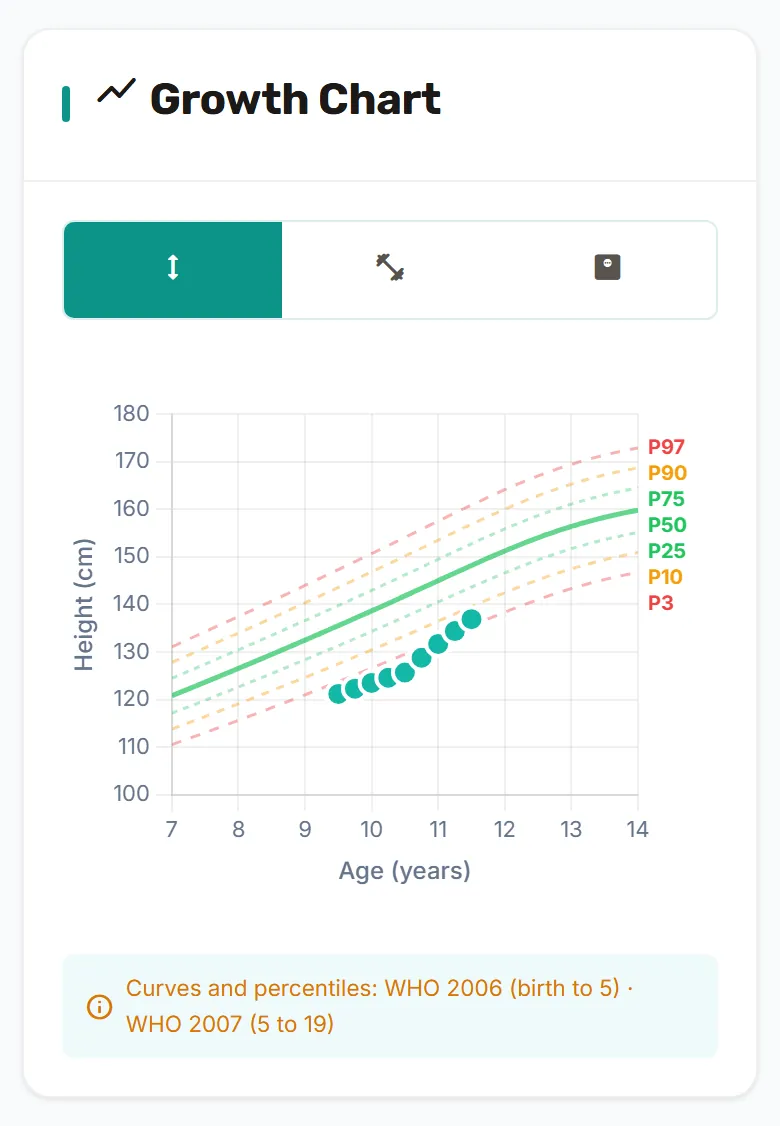
The growth chart shows the measurements on the P3, P10, P25, P50, P75, P90 and P97 percentile curves, in three tabs: height, weight and BMI. The curves and percentiles are calculated from the World Health Organization's official tables, and only from them:
- WHO Child Growth Standards 2006: from birth to age 5.
- WHO Growth Reference 2007: from age 5 to 19.
WHO publishes weight-for-age percentiles only up to age 10, so past age 10 the app points to the BMI percentile. The curves end at age 19, and past age 19 the chart shows the values only, without percentiles.
Summary, measurement list and report
The “Growth Summary” card shows the latest height and weight with the percentile of each, the total growth since the first measurement and the number of months tracked. Further down the page, under “Measurement History”, all the measurements are kept, and you can edit or delete any of them.
“Growth report” opens the tracking report at its growth section: the chart, the table of measurements with percentiles, and the annual height velocity, calculated from the latest height measurement and an earlier one at least 6 months apart.
What the app doesn't do
GrowTracker shows the measurements and the percentiles. It doesn't determine whether growth is normal and draws no conclusions about the treatment.
The Pro plan, and who sees the data
Growth tracking is part of the Pro plan. It follows the plan of the parent who manages the child, so an invited second parent sees it when the child is on the Pro plan, even without a subscription of their own. The parent who manages the child, a co-parent and the child's own login can add and edit measurements. The plans are compared on the pricing page.
Who it helps
- For parents: all the measurements are kept in one place, with the date and source.
- For teens who inject on their own: the chart and the measurements are available in their own login too.
Alongside the measurements, the injection log keeps every injection that was marked, and sharing between parents decides who else sees the data. More about GrowTracker on the features page, and short answers in the FAQ.
Questions about growth tracking
Is growth tracking included on Essential?
Growth tracking isn't included on Essential: it is part of the Pro plan, on which the tracking report also includes the measurements and percentiles.
Does GrowTracker say whether growth is normal?
GrowTracker doesn't say whether growth is normal: it shows the measurements on the curves and calculates percentiles.
Which curves does GrowTracker use?
GrowTracker uses only the World Health Organization's curves: WHO Child Growth Standards 2006 from birth to age 5, and WHO Growth Reference 2007 from age 5 to 19.
Why is there no weight percentile after age 10?
GrowTracker has no weight-for-age percentile past age 10, because WHO publishes it only up to age 10; instead, the app points to the BMI percentile, which is calculated when a measurement has both height and weight.
Can I enter past measurements?
You can enter past measurements: choose the measurement date, and the percentile is calculated for the age on that day. Only a future date isn't saved.
Want to try GrowTracker?
30-day free trial. Essential needs no credit card.